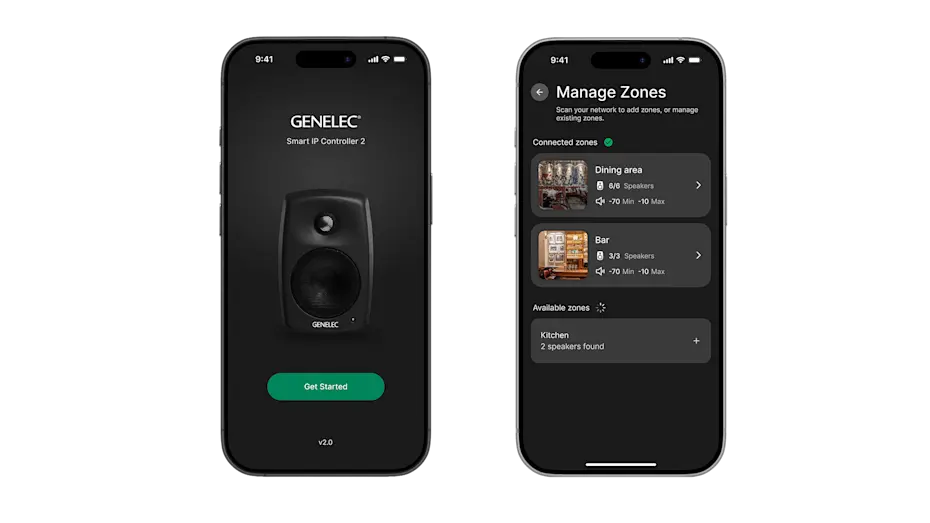
Genelec has released Smart IP Controller 2.0, a redesigned mobile app for controlling its Smart IP networked loudspeaker systems. While this may not sound like the kind of announcement that immediately grabs the attention of mixers, sound editors or composers, it is potentially useful for post-production facilities, education spaces, review rooms and multi-room audio environments where loudspeaker systems need to be managed by more than one type of user.
The update arrived on 3 June 2026 and introduces a completely new user interface designed to make daily control faster, clearer and more accessible. Rather than being aimed primarily at deep technical setup, the app is focused on everyday operation: selecting zones, adjusting levels, muting spaces, powering systems on and off, and recalling useful room profiles.
For facilities that already use Genelec Smart IP loudspeakers, this kind of update is less about changing the sound of the room and more about reducing operational friction. In busy post-production environments, the difference between a system that only the engineering team understands and one that production staff, lecturers, assistants or client-facing teams can operate confidently can be significant.
What is Genelec Smart IP?
Genelec’s Smart IP range is built around networked active loudspeakers designed for installed audio environments. Instead of relying on separate analogue cabling, speaker-level amplification and traditional room control systems, Smart IP loudspeakers use network infrastructure to carry audio, power and control.
This makes the system particularly relevant to spaces where audio needs to be distributed across several rooms or zones. Examples include education buildings, corporate media suites, galleries, broadcast support areas, hospitality environments, museums, screening spaces and post-production campuses.
In a post-production context, this does not necessarily mean replacing the main calibrated mix room monitoring chain. Traditional nearfield, midfield and immersive monitoring systems remain central to critical mix decisions. However, there are many other rooms in a facility where high-quality installed audio matters: client lounges, edit suites, teaching rooms, presentation spaces, review rooms, production offices, demo rooms and smaller creative spaces.
These are the kinds of environments where day-to-day control can become surprisingly important.
What does Smart IP Controller 2.0 do?
Smart IP Controller 2.0 is a mobile app for iOS and Android devices that allows users to control Genelec Smart IP loudspeaker zones from a phone or tablet.
The app automatically discovers the loudspeaker zones available on the network. Once the system has been configured, users can be given access to the relevant zones and can manage them without needing to open specialist configuration software.
Core controls include:
• volume adjustment
• mute
• power on and off
• zone selection
• preset or profile recall
• access to EQ, level and input settings created during system setup
This distinction is important. Smart IP Manager remains the deeper configuration tool used by installers or technical teams. Smart IP Controller is more about giving end users practical access to the controls they need each day.
In other words, Controller 2.0 is not primarily designed for designing the system. It is designed for operating it.
Why the redesign matters
The new version has been rebuilt around a more responsive and intuitive interface. That matters because many installed audio systems fail not because the technology is incapable, but because the control layer is confusing.
In a real facility, the people using the loudspeakers are not always the same people who installed or configured them. A technical manager might create the room layout and system profiles, but the day-to-day users might include producers, runners, lecturers, visiting directors, students, front-of-house staff or clients.
If the control app is too technical, people either avoid using it or ask engineering staff to make every small change. That can lead to unnecessary interruptions, inconsistent room settings, incorrect volume levels, or systems being left powered on when they are not needed.
A simpler interface does not just make the system feel nicer to use. It can also support better operational discipline.
The post-production angle
For audio post-production facilities, the obvious priority is always the main mix environment: translation, calibration, speaker layout, room acoustics, monitoring level and deliverable compliance. However, modern post facilities are no longer just one room with one engineer. They are often networks of creative, technical and client-facing spaces.
A single project may move through dialogue editing, ADR review, Foley spotting, editorial playback, producer approval, client screenings and final mix sign-off. Not every one of those stages requires a full theatrical mix room, but many of them benefit from reliable, high-quality audio playback.
This is where networked loudspeaker control becomes relevant.
Imagine a facility with several smaller review rooms. One space may be used for director playback in the morning, a client presentation in the afternoon and an internal editorial meeting later in the day. Another room might be used by students or assistants for checking edits. A third might be part of a reception or gallery-style installation area.
In each case, the technical requirements may be modest compared with a full dubbing stage, but the operational requirements are real. Someone needs to turn the correct system on, choose the correct room or zone, recall an appropriate level or profile, and avoid disturbing adjacent spaces.
Smart IP Controller 2.0 appears to be aimed directly at making that kind of routine control easier.
Why this is facilities-facing rather than mix-engine-facing
It is worth being clear about what this update is not.
This is not a new mix processor. It is not a new loudspeaker model. It is not a replacement for proper room calibration, acoustic treatment, monitor alignment or technical system design. It will not make a poorly designed playback environment suddenly translate like a world-class dubbing stage.
Instead, its value sits closer to facilities management and daily workflow.
For a re-recording mixer, the update may not radically alter the creative process inside the main mix room. But for the wider post-production business, it could still matter. Anything that makes rooms easier to access, easier to manage and easier to hand over between users can save time.
That is especially true in facilities where technical staff are stretched across multiple rooms. If producers and client-facing teams can confidently manage basic loudspeaker functions without calling an engineer every time they need a room switched on, muted or adjusted, the whole facility becomes slightly more efficient.
Why zone control matters
Zone control is one of the most practical features in this kind of app.
A “zone” might be a specific room, a group of loudspeakers within a room, a client area, a teaching space or a distributed playback area. Once zones have been configured, users can be given access to the areas they need.
This can be useful in several scenarios:
• A producer can control the playback level in a client review room without accessing technical settings for other rooms.
• A lecturer can operate a classroom playback system without needing to understand the whole building’s audio network.
• A technical manager can create different access levels for different users.
• A facility can separate public, private, teaching and production spaces.
• A non-technical user can turn off the correct loudspeaker zone at the end of a session.
In a post-production environment, the benefit is not only convenience. It is also risk reduction. The fewer unnecessary technical controls exposed to casual users, the less likely someone is to change a setting they do not understand.
Profile recall and room consistency
One of the more interesting features is quick access to profiles created in Genelec’s Smart IP Manager software. These profiles can include settings such as EQ, level and input configuration.
For post-production and education spaces, this could be useful because rooms are often used for different purposes. A small playback room might need one profile for casual review, another for presentation playback and another for a specific teaching or demonstration setup.
In an educational environment, a room might be used for:
• lecture playback
• student project review
• film sound demonstrations
• immersive audio introductions
• listening tests
• guest presentations
Each scenario may need a slightly different operational setup. Profile recall makes it easier to move between those use cases without asking users to manually adjust technical parameters.
For post facilities, the same idea applies to client-facing rooms. A review room may not need to be calibrated to the same level of precision as a dubbing stage, but it still benefits from repeatable settings. Consistency helps avoid the classic problem of a room sounding different every time someone uses it.
The importance of non-technical usability
A common issue in professional audio is that technical systems are often designed by experts for experts. That is fine inside specialist rooms, but it can become a problem when the system needs to be used by a wider team.
Post-production facilities do not only rely on engineers. They also rely on producers, assistants, editors, coordinators, clients, directors, agency staff, students, lecturers and administrators. These users may need access to playback, but they should not necessarily be expected to understand routing, IP audio, EQ curves or loudspeaker management.
A well-designed control app can act as a bridge between the technical infrastructure and the people who need to use it.
That is why the language around Controller 2.0 matters. Genelec is positioning the app around faster, clearer and more accessible day-to-day operation. The aim is not to remove the need for technical expertise during installation and configuration. The aim is to make the finished system easier to use once that technical work has already been done.
Potential benefits for education spaces
For universities, colleges and training providers, this kind of system could be particularly useful.
Music production, film production, media and sound design departments often operate multiple teaching and production spaces. These may include recording studios, computer labs, edit suites, screening rooms, immersive audio rooms, lecture theatres and smaller project rooms.
Not every room needs a full studio monitoring system, but many rooms still need dependable playback. In those environments, easy zone control can help lecturers and students use the system without placing constant demands on technical staff.
For example, a lecturer might want to play a film scene in a teaching room, switch to a music production example, mute the room during discussion, then power down the system afterwards. If that can be done from a clear mobile interface, the room becomes easier to run.
For institutions with several rooms, the ability to assign different zones to different users may also help keep control organised. Students do not necessarily need access to every loudspeaker system in the building. Lecturers may need access to specific teaching spaces. Technicians may need access to everything.
Potential benefits for post-production businesses
For post-production businesses, the benefit is likely to be most noticeable in spaces that sit around the main mix rooms.
These might include:
• client review rooms
• edit suites
• production offices
• ADR prep rooms
• meeting rooms
• reception or presentation areas
• smaller screening spaces
• demo rooms for prospective clients
In these areas, the priority is often not advanced monitoring control. It is reliability, speed and ease of use.
A client arrives. The room needs to be ready. The correct playback zone needs to be active. The level needs to be appropriate. The system needs to feel professional without requiring a technical explanation.
That kind of detail contributes to the client experience. A facility can have outstanding engineering talent, but if every playback moment begins with someone struggling to find the right control, the experience feels less polished.
Controller 2.0 is therefore part of a broader trend: professional audio systems are becoming more networked, but the user-facing control needs to become simpler, not more complicated.
Networked audio and the modern facility
Audio-over-IP has changed the way many facilities think about installation and system design. Instead of treating each room as a completely separate island, networked systems allow audio, control and management to be integrated across a building.
That does not mean every studio should abandon traditional audio infrastructure. Critical listening rooms still need careful design, monitoring accuracy, appropriate speaker placement and technical supervision. But in installed and support spaces, networked active loudspeakers can simplify cabling and centralise management.
Smart IP Controller 2.0 fits into this wider direction. It is not the network itself; it is the practical control surface that helps users interact with the network without needing to understand the whole technical layer underneath.
That is a subtle but important distinction. As audio systems become more powerful, the best day-to-day tools are often the ones that hide complexity rather than expose it.
What facilities should consider before updating
For facilities already using Genelec Smart IP, the obvious next step is to evaluate how Controller 2.0 fits into existing workflows.
Useful questions include:
• Which rooms or zones should be available to production staff?
• Which zones should remain restricted to engineering or technical teams?
• Do different users need different access levels?
• Are existing profiles clearly named and useful for non-technical users?
• Could client-facing rooms benefit from simpler power, mute and volume control?
• Are there rooms where staff currently rely too heavily on engineers for basic operation?
• Does the current room-control workflow create avoidable delays?
The app will only be as useful as the system design behind it. If zones are badly named, profiles are unclear or access is not thought through, a better interface will not solve every problem. However, if the underlying Smart IP system is already organised properly, Controller 2.0 may make that organisation more usable for the wider team.
A small update with practical implications
On the surface, a mobile control app update may look like a minor product story. For mix engineers, it may not be as exciting as a new monitor, console, plugin or immersive audio tool.
But for post-production facilities, education buildings and multi-room media spaces, these small operational improvements can matter. Facilities are judged not only by the quality of their main rooms, but also by how smoothly the whole environment works.
A well-designed review room, teaching space or client playback area should be simple to operate. Users should not need to understand the full network architecture just to turn on the correct loudspeakers, adjust the level or recall an appropriate room profile.
That is the practical value of Genelec’s Smart IP Controller 2.0. It supports a more accessible layer of control for networked loudspeaker systems, helping non-technical users manage everyday playback while leaving deeper configuration in the hands of the technical team.
For post-production campuses, education providers and facilities with multiple playback zones, the update is worth reviewing. It may not change the creative decisions made in the mix room, but it could make the rest of the building easier to manage.
https://www.genelec.com/-/news/genelec-reveals-smart-ip-controller-2.0-app
#PostProductionAudio #AudioPostProduction #PostFacility #StudioMonitoring #NetworkedAudio
#MusicProduction #Genelec MusicTechnology
Discover more from AV On the Edge Education
Subscribe to get the latest posts sent to your email.

